An ADHD daily planner built for real days
A calm daily planner that helps you choose one thing that matters, take a few small wins, and pick the day back up when it slips.
An ADHD daily planner is a simple planning tool shaped around how ADHD attention actually works, one clear priority first, then a few small wins, with room to restart when the day slips. Most planners assume a calm, predictable day. ADHD days are rarely like that. You start with good intentions, then a message pulls you sideways, a small task swells into three hours, and by the afternoon the plan reads like a list of things you already missed. CommandCenterADHD is a daily planner built for that reality. It helps you choose one thing that matters, collect a few small wins, and keep moving when the day changes shape.
Why most daily planners stop working for ADHD
A long list looks organized, but it hides the one thing that actually matters today. When every item feels equal, your attention scatters and the hardest task quietly drifts to tomorrow. Rigid hourly schedules have the opposite problem. The moment real life breaks the timing, the whole grid feels wrong and you abandon it.
A planner that works with ADHD needs to be gentle about priorities and forgiving about time. It should make the next step obvious and make it easy to start again after an interruption, because interruptions are the normal case, not the exception.
One priority, then a few quick wins
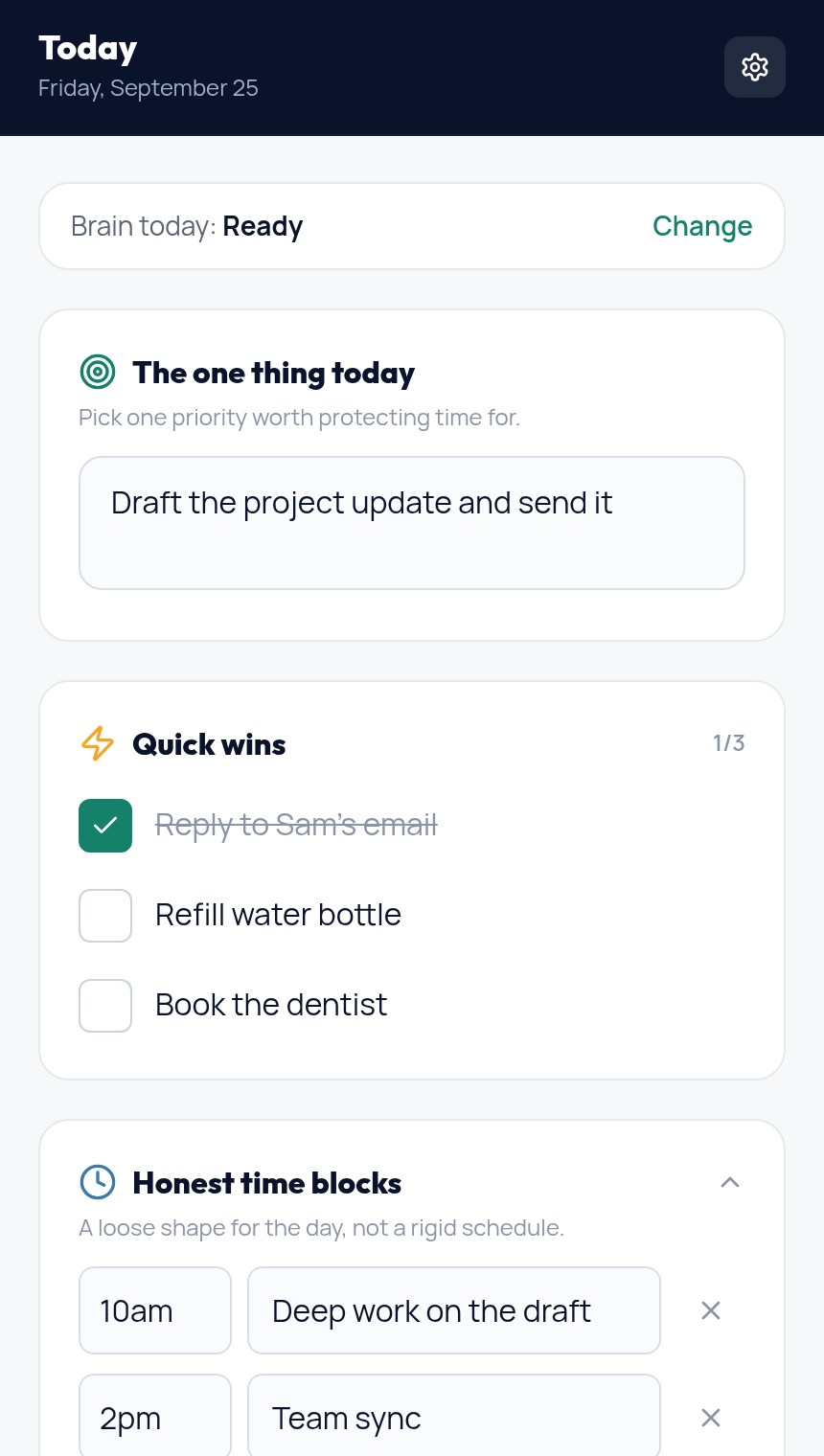
Each day starts with a single question. What is the one thing worth protecting time for today. You write that down first, before anything else competes for space. Under it you keep a short set of quick wins, small finishes that give you momentum without draining you. The goal is progress you can feel, not a perfect record.
If choosing the one thing is the hard part, the free What should I do next tool can pick a starting point for you in a few seconds.
Honest time blocks instead of a rigid schedule
Instead of locking every hour, you sketch a loose shape for the day. Something in the morning, something in the afternoon, a soft edge around the evening. If a block moves, you move it and nothing turns red. This keeps the plan useful when the day shifts, which with ADHD it usually will.
What a real day looks like
Picture a Wednesday. You open the Today web app and set one priority, draft the project update and send it. Under it you add three quick wins, reply to Sam, refill your water, and book the dentist. You sketch two loose blocks, deep work in the morning and a team sync at two. By late morning the sync moves and a new request lands in your inbox. The old plan would feel ruined. Here you just move the block and keep going.
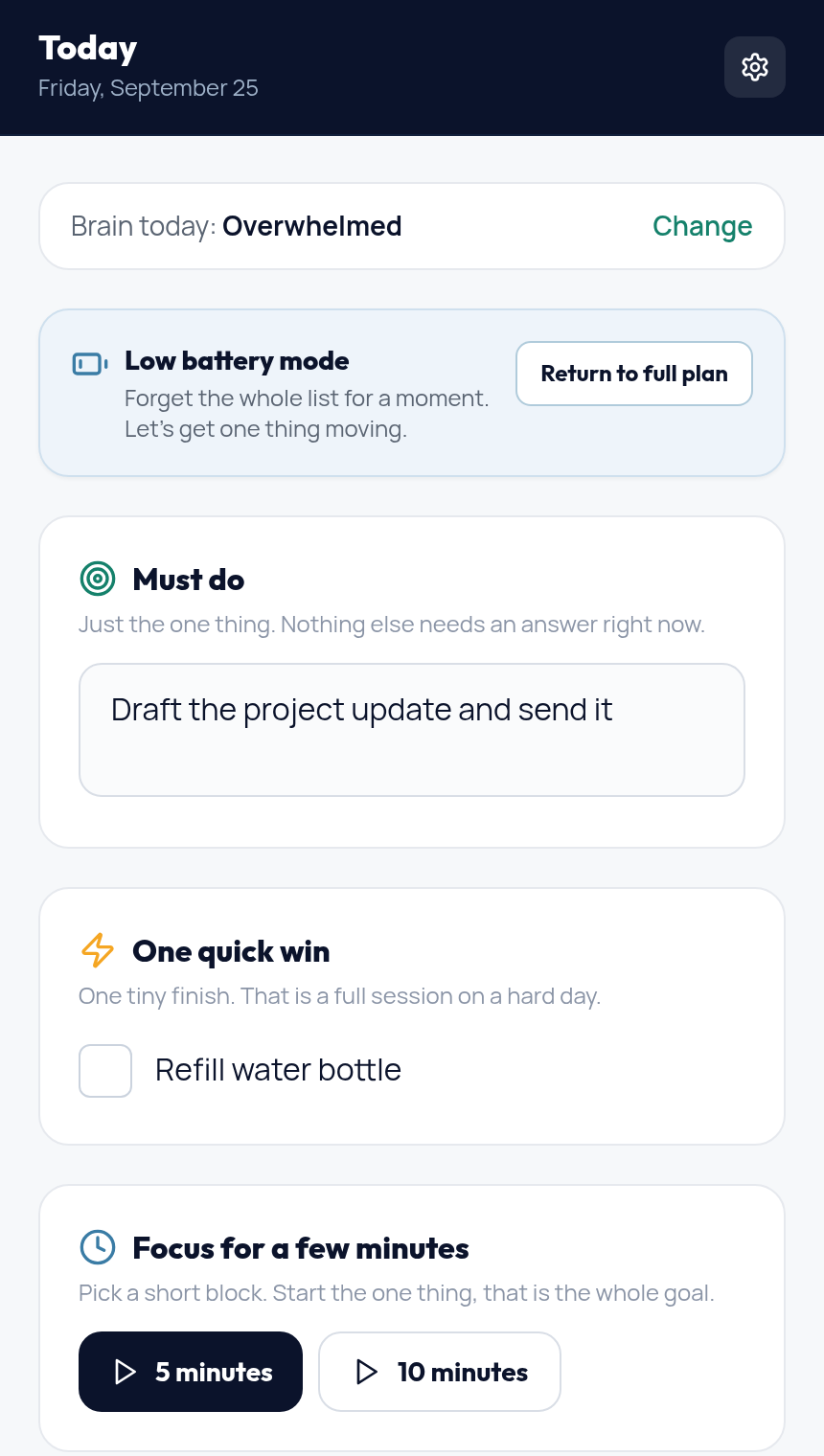
After lunch the wheels come off and focus disappears. Instead of pushing, you switch on Low Battery Mode. The screen shrinks to one must do and one quick win, with a short focus timer. You start a five minute block, finish one small thing, and the day is moving again. Nothing was backfilled and nothing turned red.
Low Battery Mode for the hard days
Some days you open the planner and everything feels like too much. For those days the Today web app has Low Battery Mode. You tell it how your brain feels, and if you are overwhelmed it shrinks the day down to what matters. You see one must do, one quick win, and a short focus timer to get moving. Everything else is tucked into a calm Can wait note you can open later. When you have more capacity, you return to the full plan in one tap. There is more about this on the ADHD overwhelm page.
The printable planner and the full system
There are two ways to use it. The free printable planner gives you the daily structure on paper, ready to use today. The full purchase includes two parts. The Notion Command Center is the planning system, and it works on the free Notion plan in any browser. The Today web app at commandcenteradhd.com/today is where you keep the daily view, quick wins, honest time blocks, and Low Battery Mode. You sign in to the Today web app with the email you used at checkout.
What it costs
The Command Center is a one time purchase of $17. There is no subscription and no recurring charge, and future updates are included. If it does not fit the way you work, there is a 30 day money back guarantee. You can read more on the no subscription page.
One time purchase. No subscription. Future updates included. 30 day money back guarantee.
Frequently asked questions
Is this a paper planner or an app?
You can use either. The free printable is paper. The full purchase includes the Notion Command Center system plus the Today web app, which you open in any browser at commandcenteradhd.com/today.
Do I need a paid Notion account?
No. The Notion Command Center works on the free Notion plan in any browser.
What if I fall behind for a few days?
That is expected. The planner is built to restart. You pick one thing today and carry forward only what still matters.
Is this medical treatment?
No. This is a planning system, not medical care or treatment. It helps you organize your day.
How is this different from a plain to do list?
A to do list treats every task as equal. This planner asks you to choose one priority first, then keeps the rest small and optional so your attention has somewhere to land.